Advanced YouTube Video Search
Powerful YouTube video search with advanced filters for date, duration, language, and more. Find exactly the videos you need — fast, free, no sign-up.
Free Advanced YouTube Video Search
Use this free advanced YouTube video search to find exactly the videos you need — with real filters, real sorting, and real export options. YouTube's built-in search keeps getting weaker and harder to use for research. Our advanced YouTube search gives back the control: filter by date, duration, and language, sort by what matters, save results to lists, export to CSV, and pull transcripts inline. Perfect for marketers, creators, researchers, and anyone who needs to find YouTube videos with precision.
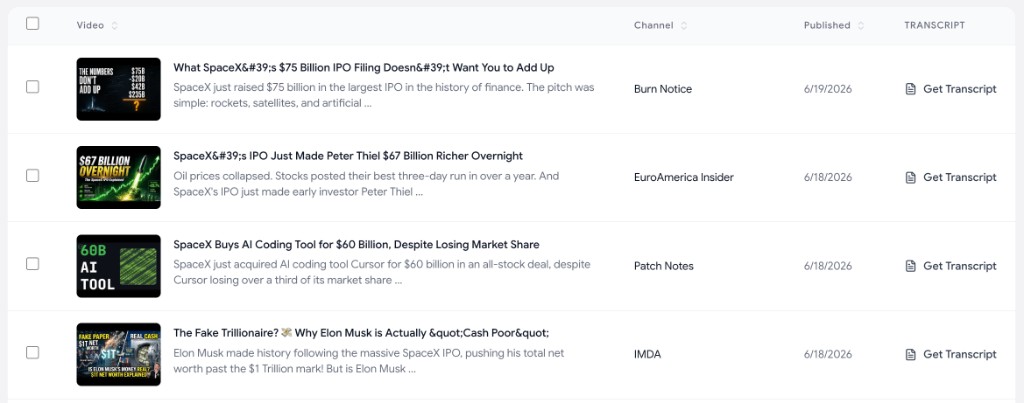
How to search YouTube with advanced filters
Find exactly the YouTube videos you need in three quick steps — no extension, no API key, no Boolean operator gymnastics.
Type your search query
Enter any keyword, topic, or phrase you want to find YouTube videos for — exactly like searching YouTube itself, but with much more control.
Apply advanced filters
Narrow your YouTube search by date published, video duration, language, and result count. Find only the videos that actually match what you need.
Browse, export, or pull transcripts
Sort and view results as a list or grid. Save videos to a list, export to CSV, or pull the transcript of any result with one click.
Why use our advanced YouTube video search
A modern YouTube search tool built for marketers, creators, and researchers who need more than YouTube's default search bar can deliver.
Filter by date published
Find YouTube videos from the last day, week, month, year, or any custom range. Perfect for tracking trends, recent uploads, and time-sensitive research.
Filter by video duration
Search YouTube for short Shorts, medium clips, or long-form podcasts and lectures. Only see videos in the length range you actually want.
Filter by language
Keep only videos whose declared audio or caption language matches your pick — English, Spanish, French, German, Japanese, and more.
Sort and export results
Sort YouTube search results by title, channel, or publish date. Export results to CSV for outreach lists, content research, or competitive analysis.
One-click transcript pulls
Get the full transcript of any video in the search results with a single click. Perfect for research, briefs, and content repurposing.
Fast and free
Search YouTube videos with advanced filters in seconds. No paywall, no ads, no sign-up, no rate limits. Just type and search.
Powered by the official YouTube API
Search results come directly from the official YouTube Data API, so what you see is always accurate, current, and clean — no third-party scraping.
Frequently asked questions
Everything you need to know about searching YouTube videos with advanced filters.
How is this different from searching on YouTube directly?
+
YouTube's built-in search is limited and constantly being changed. This tool lets you apply real advanced filters — by exact date range, video duration, language, and result count — sort results by multiple fields, export to CSV, and pull transcripts inline. It is built for research, not just casual viewing.
Is this advanced YouTube search free?
+
Yes. This advanced YouTube video search is 100% free — no ads, no paywall, no sign-up, no API key. Run as many searches as you want.
Can I filter YouTube videos by date?
+
Yes. Pick from preset date ranges (last 24 hours, week, month, year) or set a custom "published after" date. Great for finding recent trending content or auditing how a topic has evolved over time.
Can I filter YouTube videos by duration?
+
Yes. Filter by Shorts, medium-length clips, or long-form videos. Perfect for finding podcasts, lectures, tutorials, or just skipping the short-form noise.
Can I filter by Shorts or exclude them?
+
Yes. Use the Shorts filter to show all videos, Shorts only, or long-form only. Shorts are detected by duration (60 seconds or less) and #shorts tags in the title or description.
Can I filter by YouTube category?
+
Yes. Choose a category like Gaming, Music, Education, or News to narrow results to videos YouTube has tagged in that category. Leave it on "Any category" to search everything.
Can I search for an exact phrase or exclude words?
+
Yes. Use Exact term to require a specific phrase in results (YouTube's quoted search syntax) and Exclude term to leave out videos that mention specific words. Separate multiple excluded words with spaces.
Can I filter YouTube videos by language?
+
Yes. We filter results using each video's declared audio/caption language from YouTube metadata, not just search relevance. Choose "Any language" to skip language filtering. Videos without language metadata may be excluded from filtered results.
Can I export YouTube search results?
+
Yes. Select the videos you want and click "Export CSV" to download a spreadsheet with the title, channel, publish date, and video link — ready to import into Notion, Airtable, Google Sheets, or your CRM.
Can I pull transcripts from the search results?
+
Yes. Each row has a "Get Transcript" button so you can grab the full transcript without leaving the search results. For more control, use the dedicated YouTube transcript downloader or pipe a transcript into the AI YouTube Video Summarizer.
Do I need to install a Chrome extension?
+
No. This is a 100% web-based YouTube search tool. Nothing to install — no extension, no API key, no software. It runs in your browser on Mac, Windows, Linux, iPad, and mobile.