Chat with YouTube Video
Ask AI any question about any YouTube video. Get instant answers, summaries, and deep analysis without watching the whole thing. Free, no sign-up.
Free Chat with YouTube Video — Ask AI Anything
Use this free chat-with-YouTube-video tool to ask AI anything about any YouTube video — instead of watching the whole thing. Paste any video URL and start an interactive AI chat that knows exactly what was said in the video. Perfect for podcasts, lectures, tutorials, interviews, and any long-form content where you need a specific answer fast. No ads, no paywall, no sign-up, no extension to install.
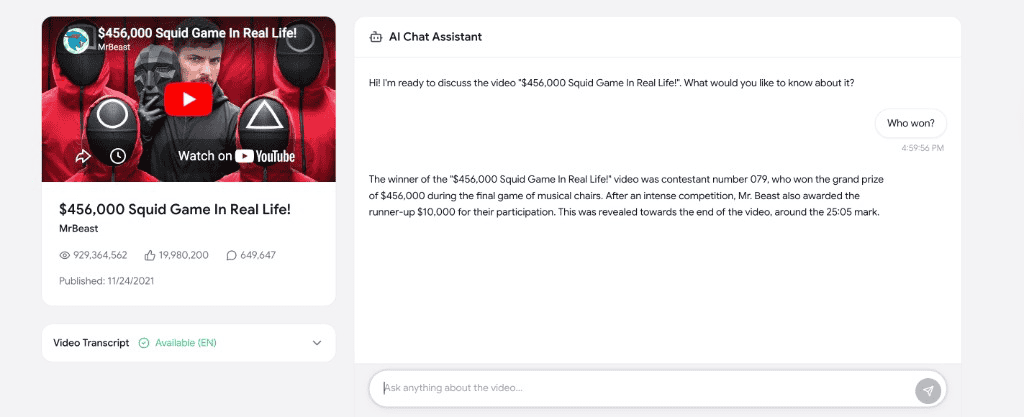
How to chat with a YouTube video
Talk to any YouTube video with AI in three quick steps — no transcript-copying, no extension, no API key.
Paste any YouTube video URL
Copy the link of the YouTube video you want to chat with and paste it into the field above. Works with youtube.com and youtu.be links.
Ask the AI anything about the video
The AI reads the entire video transcript. Ask anything — for a summary, the main argument, specific quotes, action steps, or your own custom question.
Get instant streamed answers
Answers stream in real time, citing the exact moments in the video. Keep asking follow-up questions until you have everything you need.
Why use Chat with YouTube Video
A modern AI chat tool built for creators, students, researchers, and anyone who needs answers from YouTube videos in seconds — not hours.
Ask anything about any YouTube video
Get instant AI-powered answers to any question about the video — summaries, key insights, fact-checks, definitions, or specific moments you care about.
Search inside long videos
No more scrubbing through 2-hour podcasts. Just ask "where do they talk about X?" and the AI tells you instantly — with the moment from the transcript.
Get direct quotes and citations
Ask for the exact line someone said. The AI quotes the video directly so you can copy it for a blog post, social media, or research notes.
Perfect for studying and research
Turn lectures, courses, and tutorials into an interactive Q&A. Ask follow-up questions until you actually understand the material.
Fast and free
Chat with any YouTube video in seconds. No paywall, no ads, no sign-up, no API key. Save hours of watching time every day.
Safe and ad-free
No browser extension, no shady redirects. We read the official YouTube transcript and run it through state-of-the-art AI chat.
Frequently asked questions
Everything you need to know about chatting with YouTube videos using AI.
How do I chat with a YouTube video?
+
Paste the YouTube video URL into the field above and click "Start Chat". The AI loads the full transcript and you can ask anything — summaries, quotes, specific moments, follow-up questions, anything.
Is chatting with YouTube videos free?
+
Yes. This AI chat-with-video tool is 100% free — no ads, no paywall, no sign-up, no API key. Chat with as many YouTube videos as you want.
What kinds of questions can I ask?
+
Anything you would normally have to watch the whole video to find out. "What's the main argument?" "Summarize the marketing tips." "Did they mention pricing?" "Quote the part about X." "Give me the action steps." The AI reads the entire transcript and answers using only what was actually said.
Does it work for long YouTube videos like podcasts and lectures?
+
Yes. Chatting with video is most useful for long-form content — podcasts, lectures, courses, interviews, conference talks. Get answers in seconds instead of scrubbing through hours of footage.
Is the AI accurate? Will it hallucinate?
+
Very accurate. The AI is grounded in the actual video transcript, so it answers based on what was really said in the video. It is much less prone to hallucination than asking ChatGPT about a video without context.
Do I need a Chrome extension or to install anything?
+
No. This is a 100% web-based chat-with-YouTube-video tool. Nothing to install — no extension, no API key, no Python script. It runs in your browser on Mac, Windows, Linux, iPad, and mobile.
What if I just want a quick summary instead of a chat?
+
If you just want a one-shot summary (bullet points, timestamps, or Q&A), use our AI YouTube Video Summarizer instead — it generates a complete summary in one click. Or grab the raw transcript with our YouTube transcript downloader and prompt it yourself.