AI YouTube Video Summarizer
Summarize any YouTube video with AI in seconds. Get bullet points, timestamps, Q&A, or a custom deep dive. Free, no sign-up, no extension required.
Free AI YouTube Video Summarizer
Use this free AI YouTube video summarizer to turn any YouTube video into a clean summary in seconds. Pick the format that fits — bullet points for skimming, timestamps for jumping to key moments, full text for reading, Q&A for studying, or a custom deep dive that you prompt yourself. Built for creators, marketers, students, researchers, and anyone tired of sitting through hour-long videos to find the one insight that actually matters.
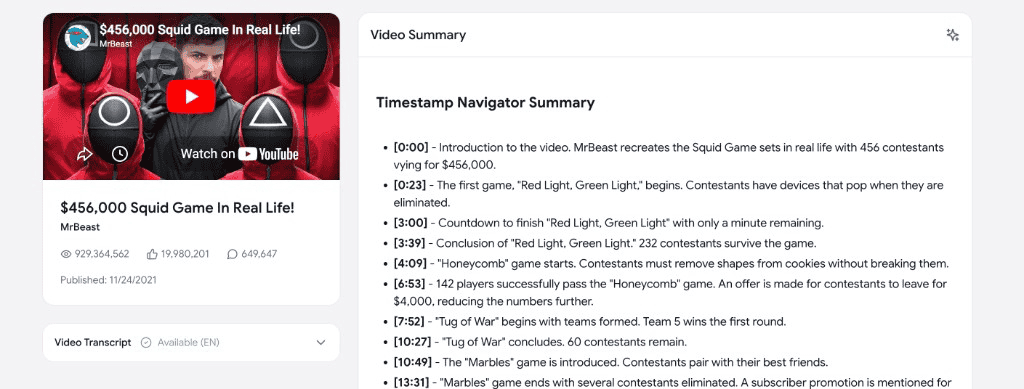
How to summarize a YouTube video with AI
Summarize any YouTube video in three quick steps — no extension, no API key, no manual transcript copying.
Paste any YouTube video URL
Copy the link of the YouTube video you want summarized and paste it into the field above. Works with youtube.com and youtu.be links.
Pick the summary format
Choose how you want the YouTube video summarized — bullet points, timestamps, full-text summary, Q&A, or a custom deep dive you can prompt yourself.
Get the AI summary instantly
Our AI reads the entire video and returns a clean, accurate summary in seconds. Save it, copy it, or paste it straight into your notes.
Why use our AI YouTube video summarizer
A modern YouTube summarizer built for creators, students, and busy professionals who want the gist of a video without watching every minute.
Bullet-point summaries
Get the key takeaways of any YouTube video as a clean bulleted list. Perfect for skimming long videos and capturing the highlights.
Timestamped summaries
See exactly when each topic is covered in the video, with clickable timestamps so you can jump to the moments that matter.
Q&A format
Turn any YouTube video into a Q&A — perfect for studying, research, or quickly answering specific questions about the content.
Custom deep-dive prompts
Ask the AI to summarize the video your way — focus on the marketing angle, the technical details, the action steps, or whatever you actually care about.
Fast and free
Summarize any YouTube video in seconds. No paywall, no ads, no sign-up, no API key. Save hours of watching time every single day.
Safe and ad-free
No browser extension, no shady redirects. We read the official YouTube transcript and run it through state-of-the-art AI summarization.
Frequently asked questions
Everything you need to know about summarizing YouTube videos with AI.
How do I summarize a YouTube video with AI?
+
Paste the YouTube video URL into the field above, pick a summary format (bullet points, timestamps, full text, Q&A, or custom), and click "Get Summary". The AI reads the entire video and returns a clean summary in seconds.
Is this AI YouTube summarizer free?
+
Yes. This AI YouTube video summarizer is 100% free — no ads, no paywall, no sign-up, no API key. Summarize as many videos as you want.
What summary formats are available?
+
Five formats: clean bullet points, timestamped summaries with clickable times, a full-text summary, a Q&A breakdown of the video, and a custom deep dive where you tell the AI exactly what you want it to focus on.
How accurate are the YouTube video summaries?
+
Very accurate. We summarize the actual video transcript with modern AI, so the summary stays faithful to what was actually said in the video — not hallucinated content. Best for videos with clean spoken audio (lectures, podcasts, tutorials, reviews, news, etc.).
Can I summarize long YouTube videos like podcasts and lectures?
+
Yes. The AI YouTube summarizer is especially useful for long-form content — podcasts, lectures, conference talks, tutorials, interviews. Get the key takeaways from a 2-hour video in 30 seconds.
Do I need a Chrome extension or to install software?
+
No. This is a 100% web-based AI YouTube video summarizer. Nothing to install — no extension, no API key, no software. It runs in your browser on Mac, Windows, Linux, iPad, and mobile.
Can I ask follow-up questions about the video?
+
Yes — if you want to ask the AI specific questions about the video instead of (or after) summarizing it, use our Chat with YouTube Video tool. You can also grab the raw transcript with our YouTube transcript downloader and feed it into your own AI prompt.