YouTube Channel Video Export — Download All Videos to CSV
Free YouTube channel video export tool. Paste any channel URL or @handle to pull every video — long-form and Shorts — into a sortable spreadsheet with titles, links, thumbnails, categories, views, likes, and comments. Preview the full channel video list instantly, then download as CSV for Excel or Google Sheets.
Free YouTube Channel Video Export Tool
Use this free YouTube channel video export tool to download every video from any public channel into a spreadsheet — titles, links, thumbnails, categories, views, and more. Most channel research means opening videos one by one. Ours gives you the full channel video list in seconds, ready to sort, filter, and download as CSV. Built for creators, marketers, and researchers who need a complete YouTube channel video catalog without manual copy-paste.
How to export all videos from a YouTube channel
Download a YouTube channel video list to CSV in three quick steps — no extension, no API key, no manual spreadsheet work.
Paste a YouTube channel URL or @handle
Drop in any public YouTube channel URL, channel ID, or @handle. We resolve the channel and pull its full uploads playlist — every long-form video and Short in one list.
Preview the full channel video list
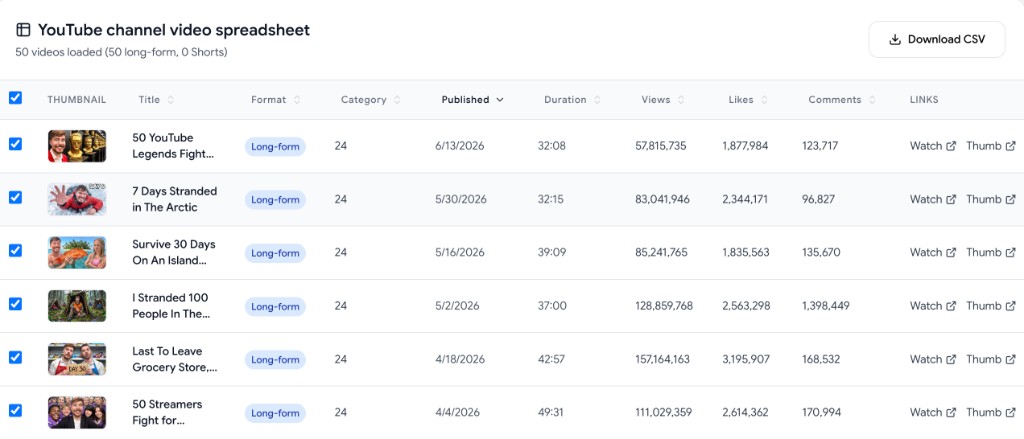
See every video in a sortable spreadsheet with titles, video links, thumbnail URLs, categories, publish dates, duration, views, likes, and comments — all in your browser.
Download the channel videos as CSV
Export the full YouTube channel video list — or just selected rows — as a CSV spreadsheet you can open in Excel, Google Sheets, Airtable, or Notion.
Why use our YouTube channel video export tool
The only free tool built to turn an entire YouTube channel into a downloadable video spreadsheet with links, thumbnails, and categories.
Every video title, link, and category
Download all videos from a YouTube channel with the data you actually need: video titles, watch links, Shorts links, thumbnail URLs, categories, descriptions, and tags — in one export.
Long-form videos and Shorts together
Most YouTube channel lists miss Shorts. This tool uses the channel uploads playlist so both long-form videos and YouTube Shorts appear in the same spreadsheet.
Sortable spreadsheet preview
Audit a channel before you download. Sort by publish date, views, likes, duration, category, or format — then export only the rows you care about.
Free, no sign-up, no extension
This YouTube channel video export tool is 100% free. No ads, no paywall, no Chrome extension, and no API key on your end.
Thumbnail links included
Every row includes direct thumbnail URLs. Need the image files too? Pair this with our YouTube channel thumbnail downloader to bulk-save thumbnails as a ZIP.
Built for competitor and creator research
Export any public YouTube channel video list for content audits, niche research, sponsorship vetting, catalog backups, or tracking what competitors publish.
Frequently asked questions
Everything you need to know about exporting a YouTube channel video list to CSV.
How do I export all videos from a YouTube channel?
+
Paste the YouTube channel URL or @handle into the field above, choose how many videos to include (20–500), and click "Export YouTube channel videos". You'll get a sortable spreadsheet with every video title, link, thumbnail, category, and stat — then click "Download CSV" to save it.
Can I download a YouTube channel video list as CSV or Excel?
+
Yes. This tool exports a YouTube channel video list as CSV, which opens directly in Excel, Google Sheets, Numbers, Airtable, and most spreadsheet apps. Each row includes the video title, URL, thumbnail link, category, publish date, duration, views, likes, comments, description, and tags.
Does this include YouTube Shorts and long-form videos?
+
Yes. The export pulls from the channel uploads playlist, so both YouTube Shorts and regular long-form videos show up in the same spreadsheet. Each row is labeled Short-form or Long-form so you can filter or sort by video type.
What data is included in the YouTube channel video export?
+
Each exported video includes: title, video URL, Shorts URL, thumbnail URL, max-resolution thumbnail URL, category, publish date, duration, view count, like count, comment count, full description, and tags.
Is this YouTube channel video export tool free?
+
Yes. It is completely free — no ads, no paywall, no sign-up, and no browser extension. Export as many public YouTube channel video lists as you need.
How many videos can I export from a channel?
+
You can export up to 500 videos per channel in a single run. That covers most audits, competitor snapshots, and catalog backups. Need thumbnails for those same videos? Use our channel thumbnail downloader after you have the list.
Do I need a Chrome extension or YouTube API key?
+
No. This is a web-based YouTube channel video export tool. Nothing to install — no extension, no Python script, no API key. It runs in your browser on Mac, Windows, Linux, and mobile.
Who uses a YouTube channel video spreadsheet?
+
Creators auditing their own catalog, marketers researching competitors, agencies vetting sponsorship channels, and researchers building datasets. A full channel video list with links and categories is faster to work with than clicking through YouTube one video at a time.