YouTube Transcript Downloader
Download YouTube transcript free as TXT, SRT, or VTT — or copy it in seconds. Export plain text, timed subtitles for video editors, or web captions. No sign-up, no extension.
Free YouTube Transcript Downloader
Use this free YouTube transcript downloader to get the full transcript of any YouTube video in seconds — then export it as TXT, SRT, or VTT. Whether you need a YouTube transcript download for notes, a YouTube SRT download for your edit, or want to download YouTube captions for a web player, our tool handles it in one click. Read along, search inside long videos, repurpose podcasts into blog posts, or feed the transcript into ChatGPT for a summary. No ads, no paywall, no sign-up, no extension to install.
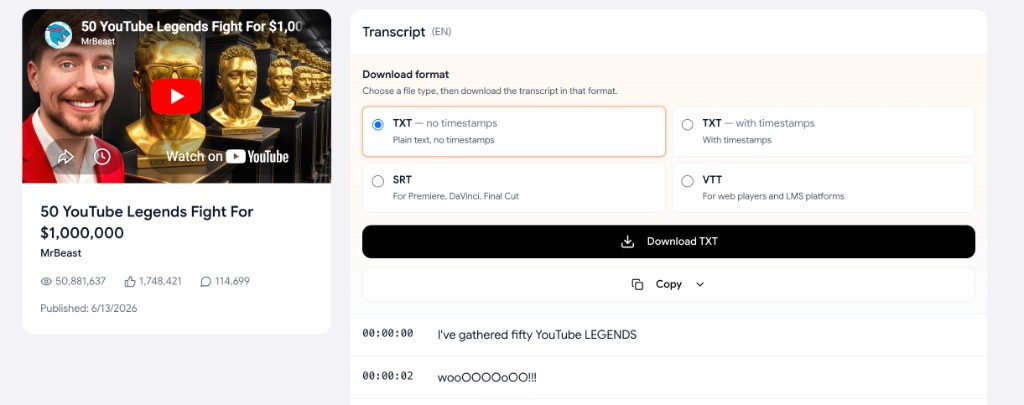
How to get a YouTube transcript
Export a YouTube transcript in three quick steps — choose TXT, SRT, or VTT, then download. No API key, no extension, no audio processing.
Paste any YouTube video URL
Copy the link of the YouTube video you want a transcript of and paste it into the field above. Works with youtube.com and youtu.be links.
Get the full transcript instantly
We pull the complete YouTube video transcript with timestamps — no waiting for AI transcription, no audio processing, no API key.
Export in your preferred format
Choose TXT (plain or with timestamps), SRT for Premiere, DaVinci, and Final Cut, or VTT for web players and LMS platforms — then download or copy.
Why use our YouTube transcript downloader
A modern YouTube transcript tool built for creators, researchers, students, and editors who need to export YouTube transcript files fast.
YouTube transcript to TXT
Export YouTube transcript to TXT as clean plain text or with timestamps. Perfect for notes, blog posts, summaries, or pasting into ChatGPT.
YouTube SRT download
Convert YouTube transcript to SRT and download timed subtitles ready for Premiere Pro, DaVinci Resolve, Final Cut Pro, and other video editors.
Download YouTube subtitles & captions
Download YouTube subtitles and captions as SRT or VTT — the standard formats for closed captions, auto-generated captions, and manual subtitles.
VTT for web & LMS
Export YouTube transcript as WebVTT (.vtt) for HTML5 video players, learning platforms, and any tool that expects web-native caption files.
Download YouTube transcript free
Get a YouTube transcript download in seconds. No paywall, no ads, no sign-up, no rate limits. Just paste the video URL and export.
Works in any language
Download YouTube transcripts in whatever language captions are available — English, Spanish, French, Hindi, Portuguese, German, and more.
Search inside long videos
No more scrubbing through hour-long videos. Get the full transcript and just Ctrl+F to find the exact line, quote, or topic you care about.
Safe and ad-free
No browser extension, no shady redirects, no malware. Runs entirely in your browser using the official YouTube transcript data.
Frequently asked questions
Everything you need to know about YouTube transcript download, subtitles, captions, and export formats.
How do I download a YouTube video transcript?
+
Paste the YouTube video URL into the field above and click "Get Transcript". You'll see the full transcript with timestamps in seconds. Pick a format — TXT, SRT, or VTT — then click Download to export the YouTube transcript, or use Copy to grab it instantly.
Can I download YouTube subtitles or captions?
+
Yes. This tool lets you download YouTube subtitles and captions in SRT or VTT format — the same timed files video editors and web players expect. SRT works in Premiere, DaVinci, and Final Cut; VTT works in browsers and LMS platforms.
Can I export YouTube transcript to SRT or TXT?
+
Yes. Choose TXT to export YouTube transcript to TXT (plain text or with timestamps), or pick SRT for a YouTube SRT download you can drop straight into your editing timeline. Both are one click after you load the transcript.
What file formats can I download?
+
Four options: TXT without timestamps (clean text), TXT with timestamps, SRT (subtitles for video editors), and VTT (subtitles for web players and LMS). All formats are free and download instantly.
Is this YouTube transcript downloader free?
+
Yes. Download YouTube transcript free — no ads, no paywall, no sign-up, no API key. You can export transcripts from as many YouTube videos as you want.
Can I get a transcript of any YouTube video?
+
You can get a transcript of any public YouTube video that has captions enabled — that's the vast majority of videos on the platform. Videos without captions (and private or unlisted videos) cannot be transcribed.
Does it work for YouTube videos in other languages?
+
Yes. The transcript downloader works for any language that the video provides captions in — including English, Spanish, Portuguese, French, German, Hindi, Arabic, Japanese, and many more.
Can I summarize the transcript with AI?
+
Absolutely. Once you have the YouTube transcript, you can paste it into ChatGPT or any AI tool — or use our AI Video Summary tool to generate a summary, bullet-point recap, or Q&A automatically. You can also chat with the video if you want to ask questions about its content.
Do I need a Chrome extension to download YouTube transcripts?
+
No. This is a 100% web-based YouTube transcript downloader. Nothing to install — no extension, no API key, no Python script. It runs in your browser on Mac, Windows, Linux, iPad, and mobile.
Can I convert a YouTube video to text?
+
Yes — that's exactly what this tool does. Paste any YouTube URL and we convert the video into a clean text transcript you can read, copy, edit, or export as TXT, SRT, or VTT.