YouTube Comment Scraper
Scrape and download comments from a single YouTube video or an entire channel and down as CSV in seconds. Free, no sign-up, no extension required.
Free YouTube Comment Scraper
Use this free YouTube comment scraper to scrape and download comments from any public YouTube video to a CSV file in seconds. Whether you are a creator mining your audience for ideas, a marketer running competitor research, or an analyst studying sentiment, our YouTube comments scraper gets the data out of YouTube and into your spreadsheet — without ads, paywalls, browser extensions, or a single line of code.
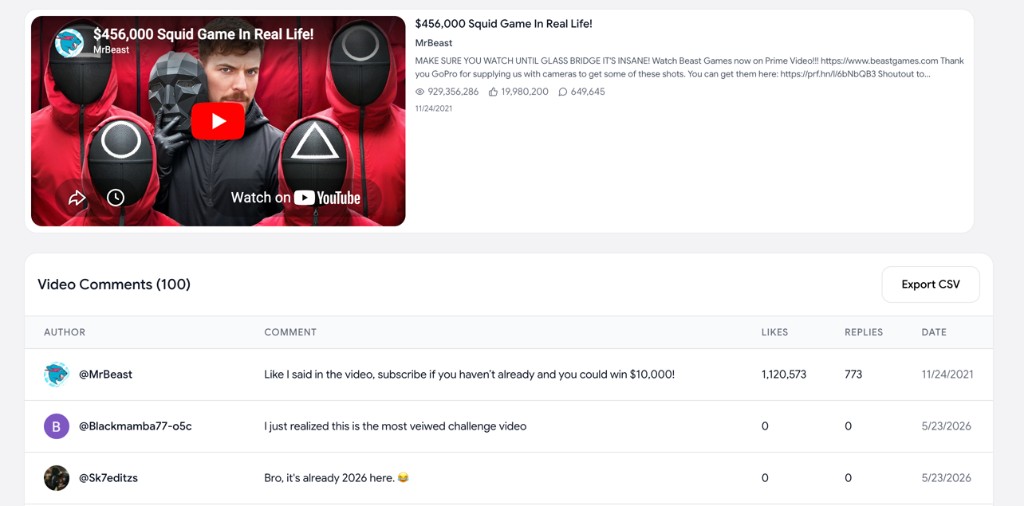
How to scrape YouTube comments
Scrape YouTube comments and download them to a CSV spreadsheet in three quick steps — no API key or extension needed.
Paste a video URL or channel URL
Drop in a single YouTube video URL to scrape its comments, or a channel URL / @handle to scrape comments from every video on the channel.
Choose how many comments to scrape
Pick up to 1,000 top-level comments on a single video, or up to 100 comments across up to 100 videos on a whole channel. No login, no API key, no extension.
Download the comments as CSV
Export a clean spreadsheet with author, comment text, likes, replies, and date — ready to open in Excel, Google Sheets, or Notion.
Why use our YouTube comments scraper
A modern YouTube comment scraper built for creators, marketers, and researchers who need clean, reliable comment data fast.
Fast and free
Scrape YouTube comments in seconds. No paywall, no ads, no sign-up. Just paste the video URL and download.
Clean CSV export
Get a structured CSV with author name, full comment text, likes, replies, and original date — perfect for sentiment analysis and audience research.
Scrape a video or an entire channel
Bulk-scrape up to 1,000 top-level comments per video — across a single video or across every video on a YouTube channel — to power your spreadsheets, dashboards, or research.
Safe and ad-free
No browser extension, no shady redirects, no risky scraping scripts. We pull data straight from the official YouTube API.
Run AI analysis on the comments
Once you have the comments, use our AI YouTube Comment Analysis tool to instantly understand what people actually think of a video — or of an entire channel. Surface sentiment, recurring themes, requests, and complaints in seconds.
Works on any public YouTube video
Scrape comments from any public video — Shorts, long-form, livestream replays, podcasts, tutorials, product reviews, and more.
Frequently asked questions
Everything you need to know about how to scrape YouTube comments with our free tool.
How do I scrape YouTube comments?
+
Paste a YouTube video URL or a channel URL / @handle into the field above, pick how many comments (and for channels, how many videos) you want to scrape, then click the button. Once they load, click "Export CSV" to download every comment with the author name, comment text, like count, reply count, and date.
Is this YouTube comment scraper free?
+
Yes. This YouTube comment scraper is 100% free, with no ads, no paywall, and no sign-up. The free tier lets you scrape up to 1,000 comments on a single video, or up to 100 comments across up to 100 videos on a whole channel. Higher limits are available on the premium plan.
Can I scrape comments from an entire YouTube channel?
+
Yes. Paste a channel URL (e.g. youtube.com/@mkbhd) or an @handle and the scraper will pull comments from every video on the channel — up to 100 videos at a time with up to 100 top-level comments each on the free tier. If you want larger pulls or sentiment analysis and tone breakdowns on top of the raw comments, try our AI YouTube Comment Analysis tool.
Can I scrape comments from any YouTube video?
+
You can scrape comments from any public YouTube video — regular videos, Shorts, livestream replays, podcasts, and tutorials. Private, unlisted, or videos with comments disabled cannot be scraped.
How many YouTube comments can I scrape at once?
+
On a single video, pick 50, 100, 200, 500, or 1,000 top-level comments from the dropdown. On a whole channel, the free tier scrapes up to 100 videos at a time with up to 100 comments each — higher limits (up to 500 videos and 1,000 comments per video) are available on the premium plan.
Do I need a Chrome extension or Python script to scrape YouTube comments?
+
No. This is a 100% web-based YouTube comments scraper. There is nothing to install — no extension, no API key, no Python script. It runs in your browser on Mac, Windows, Linux, iPad, and mobile.