Twitter / X Video Embed
Paste a link to any public Twitter / X post and get just the video — no tweet text, no buttons. Copy the link to use it anywhere, and preview it right here first.
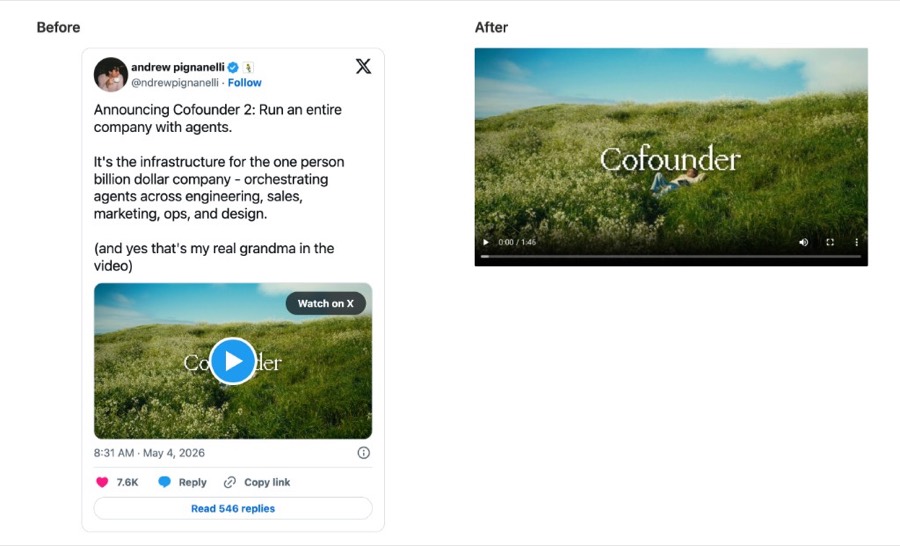
Twitter / X Video Embed — Just the Video, No Tweet Text
Want to show a video from Twitter / X without all the clutter around it? Paste the link to any public post and this tool gives you just the video — no username, no caption, no likes or replies, and no “Watch on X” button. You get a clean video and a link you can copy and drop into your website, blog, or anywhere else. Preview it right here first, then copy and go. Free, no sign-up.
Why use our Twitter / X video embed
A simple way to show a Twitter / X video on its own — without dragging the whole post along with it.
Just the video — no tweet text
You get only the video. No username, no caption, no likes, no replies, no “Watch on X” button — just a clean, full-size player you can show on its own.
A link you can copy anywhere
Paste it into your website, blog, newsletter, or anywhere that lets you add a video. The link works on its own without the original post.
See it before you use it
The video plays right here on the page, so you know you grabbed the right clip before you copy the link.
Fast and free
No sign-up, no account, no app to install. Paste a link and get your video in a couple of seconds.
Safe and ad-free
No pop-ups, no sketchy redirects, no browser extension. Just a simple tool that does one thing.
Built on open source
The video is found using a free, open-source project called FxTwitter — no hidden keys or secret tricks.
Frequently asked questions
Everything you need to know about embedding a Twitter / X video on its own.
How do I embed a Twitter / X video without the tweet text?
+
Copy the link to the X post, paste it into the box above, and click the button. You’ll get just the video — no username, caption, or replies — plus a link you can copy and use anywhere.
Can I show only the video and hide the post text?
+
Yes — that’s the whole point. Twitter’s normal embed brings the whole post: the handle, the caption, the likes, and a “Watch on X” button. This tool gives you only the video, on its own.
Where can I use the video link?
+
Anywhere that lets you add a video by link — your website, blog, landing page, newsletter, or notes app. The video plays on its own without the original tweet.
Is this free? Do I need an account or an extension?
+
It’s 100% free. No sign-up, no account, and no browser extension. It runs right in your browser on Mac, Windows, phones, and tablets.
Does it work with both x.com and twitter.com links?
+
Yes. Paste either an x.com or a twitter.com link — both work. The post just needs to be public and contain a video.
What open-source project does this use?
+
The video is found using FxTwitter, a free and open-source project. There’s no secret here — it simply looks up the public video for the post you paste in. It’s a community-run project, so it isn’t officially supported by X.
Why doesn’t it work for some posts?
+
Only public posts work. If the account is private or protected, or the post was deleted, or it doesn’t actually contain a video, there’s nothing for us to pull in.
Can I use these videos commercially?
+
Videos on X belong to the people who posted them. Use them for personal reference and always get permission before reusing someone else’s video publicly or commercially.