AI YouTube Comment Analyzer
Analyze YouTube channel comments with AI to uncover sentiment, trends, and audience insights in seconds. Free, no sign-up, no extension required.
Free AI YouTube Comment Analyzer
Use this free AI YouTube comment analyzer to instantly understand what people really think about a video or an entire channel. We scrape the comments and run AI sentiment analysis on every one — tagging them positive, negative, or neutral — so you can see audience reaction in seconds instead of doom-scrolling through thousands of replies. Built for creators, marketers, and researchers who need real audience insight, fast.
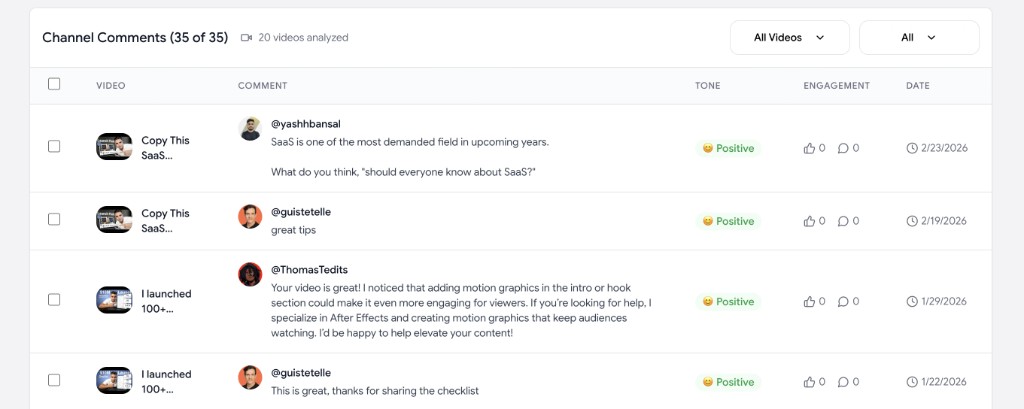
How to analyze YouTube comments with AI
Analyze YouTube comments from any video or whole channel in three quick steps — no API key, no extension, no spreadsheet wrangling.
Paste a YouTube video or channel URL
Drop in any public YouTube video URL or a channel URL / @handle. Our AI YouTube comment analyzer works on both single videos and entire channels.
Choose how many comments to analyze
For a single video, analyze up to 1,000 comments. For a whole channel, pick how many videos to process and how many comments per video.
Get AI-powered insights instantly
Our AI labels every comment by sentiment (positive, negative, neutral) so you can see at a glance how your audience really feels. Export the full analysis to CSV.
Why use our AI YouTube comment analyzer
A modern YouTube comment analysis tool built for creators, marketers, and researchers who want instant, AI-powered audience insight.
AI sentiment analysis on every comment
Each YouTube comment is auto-tagged as positive, negative, or neutral so you can instantly read the room without scrolling through thousands of replies.
Works on a single video or a whole channel
Analyze YouTube comments from one video or pull comments from many videos across an entire channel — perfect for competitor research and audience deep dives.
Spot trends, requests, and complaints
Surface what your audience really wants. Find recurring questions, ideas for new videos, and the objections holding back your conversions.
Fast and free
Analyze hundreds of YouTube comments in seconds. No paywall, no ads, no sign-up, no API key. Just paste a URL and go.
Export sentiment-tagged CSV
Download a clean CSV with every comment plus its AI sentiment label, likes, replies, and date. Need raw comments only? Use our YouTube comment scraper instead.
Safe and ad-free
No browser extension, no shady redirects, no risky scraping scripts. We use the official YouTube API to pull comments and run AI analysis on the results.
Frequently asked questions
Everything you need to know about analyzing YouTube comments with AI.
How do I analyze YouTube comments with AI?
+
Paste a YouTube video URL, channel URL, or @handle into the field above and click "Analyze Comments". Our AI YouTube comment analyzer will scrape the comments and tag each one with a sentiment label (positive, negative, or neutral) so you can quickly see what people think.
Can I analyze comments from an entire YouTube channel?
+
Yes. You can analyze YouTube comments from an entire channel — across many videos at once. Choose how many videos to process (20–500) and how many comments to pull per video. This is the fastest way to do bulk YouTube channel comment analysis.
Can I analyze comments from a single YouTube video?
+
Yes. Just paste a video URL instead of a channel URL. The AI comment analyzer will pull and analyze up to 1,000 comments from that single video — perfect for understanding sentiment on one specific video.
Is this AI YouTube comment analyzer free?
+
Yes. The tool is 100% free — no ads, no paywall, no sign-up, no API key required. Analyze YouTube comments and export the sentiment-tagged CSV at no cost.
What kind of insights does the AI surface?
+
Every comment is labeled positive, negative, or neutral so you can see overall audience sentiment at a glance. Sort and filter by sentiment to quickly find recurring complaints, common questions, viral fans, video ideas, and objections — the kind of qualitative signal that takes hours to mine by hand.
Do I just need the raw comments without AI analysis?
+
If you only need to download the comments themselves without sentiment analysis, use our free YouTube comment scraper — it exports comments to CSV in seconds.
Do I need to install a Chrome extension or script?
+
No. This is a 100% web-based AI YouTube comment analyzer. Nothing to install — no extension, no API key, no Python script. It runs in your browser on Mac, Windows, Linux, iPad, and mobile.