How to Find Your Own Comments on YouTube (Fast)
Quick answer (TL;DR): To find a comment you posted on YouTube, open your comment history: on desktop go to your History, then click Comments under Manage all history, or open Google My Activity and filter by YouTube. Both list every comment you've made, newest first. If you remember which video it was on but can't scroll to it, search that video for a word from your comment with a comment finder.
You typed out a thoughtful reply, and now — a week later — you want to find it again, maybe to check if anyone responded. YouTube makes this harder than it should be: there's no "my comments" button next to your profile. But the history does exist, in two places. Here's how to get to it on every device, plus what to do when a comment seems to have vanished.
Can you see all the comments you've made on YouTube?
Yes. YouTube keeps a running log of every comment you post while signed in, and Google stores the same data in your account-wide activity. There are two reliable ways in:
- YouTube History → Comments — your comment history inside YouTube itself.
- Google My Activity — the same comments, searchable, in your Google account.
Both are tied to your Google account, so you'll need to be signed in to the account you commented with. (If you've posted from more than one channel/brand account, switch to the right one first.)
How to find your YouTube comment history on desktop
The fastest route is through YouTube's own History page:
- Go to youtube.com and make sure you're signed in.
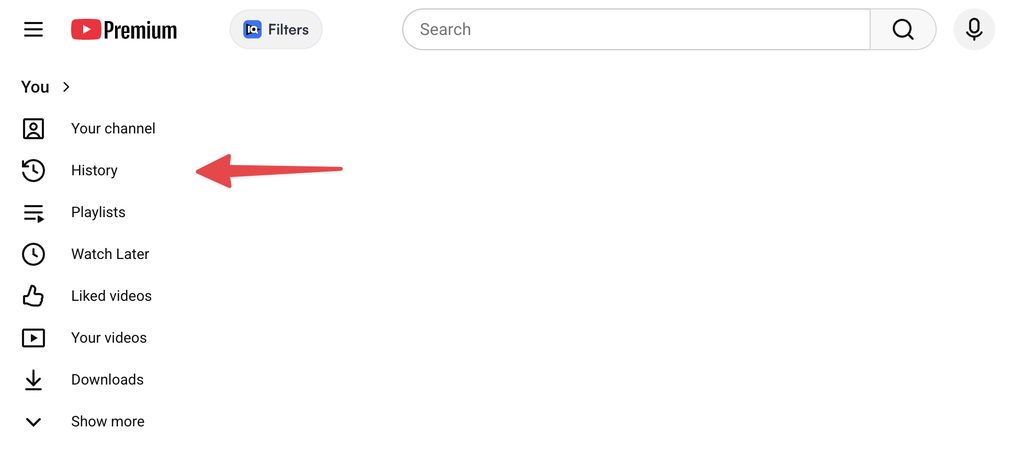
- In the left sidebar, under You, click History.
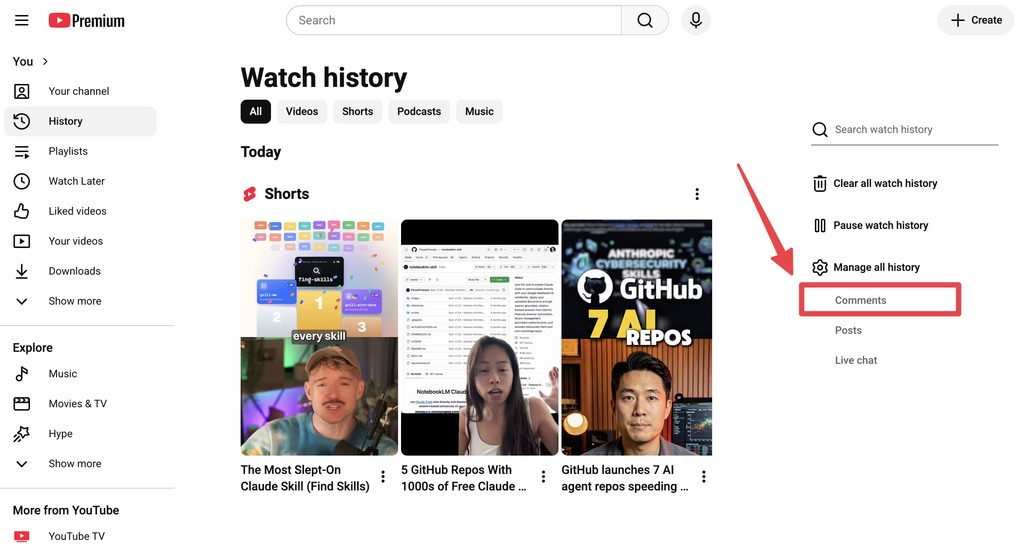
- On the Watch history page, look at the right-hand panel. Under Manage all history, click Comments.
- This opens Your YouTube comments in Google My Activity: a list of your comments, newest first, each linked to the video it's on. Click the video link to jump to the comment in context, or use the X to delete it.
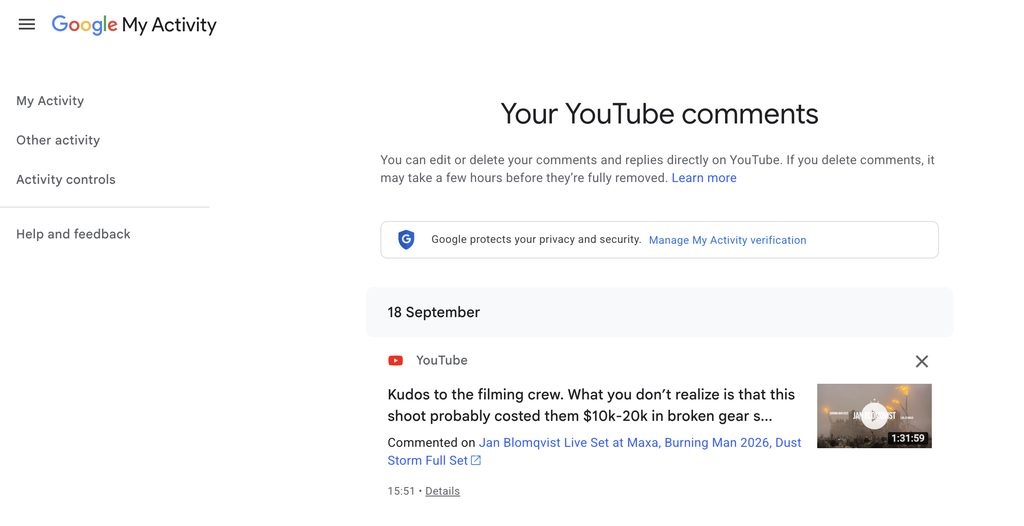
This is the cleanest view because every entry links back to the original video, so you can check for replies or edit/delete the comment from there.
If you'd rather search than scroll, use Google My Activity instead:
- Open myactivity.google.com and sign in.
- Filter the activity by YouTube (or use the search bar at the top).
- Type a word you remember from your comment to jump to it.
My Activity is the better option when you don't remember the video and just recall a phrase you wrote — it searches across your whole history, which the YouTube view doesn't.
How to find your comments on the mobile app
The YouTube mobile app doesn't surface comment history as cleanly as desktop. The dependable workaround is to use a browser on your phone:
- Open a mobile browser (Safari or Chrome) and go to myactivity.google.com, signed in to the right account.
- Filter by YouTube and search for a word from your comment.
Alternatively, open youtube.com in the mobile browser, request the desktop site if needed, and use the History → Comments view described above. Either way, a browser gets you to the same history the app keeps tucked away.
How to find a specific comment you left on a video
Sometimes you know exactly which video you commented on — you just can't find your comment among thousands of others, and YouTube won't let you search the comment section. Two ways to surface it:
- Browser find (
Ctrl/Cmd + F) works only if the comment section is short enough that everything has loaded on the page; on a busy video it won't reach far-down comments. - A comment finder searches the full set. Paste the video link into the comment finder, enter a distinctive word from your comment (or your own username, which shows next to each result), and it pulls the matching comment without endless scrolling.
For the full rundown of searching any comment section — not just your own — see how to search YouTube comments.
What to do when you can't find an old comment
If a comment isn't in your history or on the video, one of these is usually why:
- You posted from a different account. Brand/secondary channels have their own history — switch accounts and check again.
- The comment was removed. The creator may have deleted it, or YouTube's spam filter may have hidden it. Held or removed comments don't show on the video.
- The video changed. If the video was deleted, made private, or had comments turned off, your comment goes with it.
- History was paused or cleared. If you (or an account admin) turned off or deleted YouTube history, older entries won't appear.
Your My Activity log is the most complete record, so check there before assuming a comment is gone for good.
How to find comments other people left
This guide is about your own comments, but the same buried-in-the-thread problem applies to anyone's comment. Since YouTube has no comment search, use a comment finder to search a video or a whole channel by keyword or author — useful for tracking a conversation, finding a link someone shared, or researching what an audience is saying. It's one of several free YouTube tools for getting data out of YouTube, including a comment downloader when you want the whole comment section in a spreadsheet.
FAQ
How do I see all my comments on YouTube? On desktop, open History from the left sidebar, then click Comments under Manage all history in the right-hand panel for a list of everything you've posted. Or open Google My Activity, filter by YouTube, and search — it holds the same comment history and is searchable.
How do I find my YouTube comment history on mobile? The app doesn't show it clearly, so use a phone browser: go to myactivity.google.com (filter by YouTube) or open the desktop version of youtube.com and use History → Comments.
Why can't I find a comment I made? Common reasons: you posted from a different channel, the creator or spam filter removed it, the video was deleted or made private, or your history was paused/cleared. Check Google My Activity, which keeps the most complete record.
How do I find a comment I left on a specific video?
If the section is short, Ctrl/Cmd + F may find it once everything loads. On a busy video, paste the URL into a comment finder and search a word from your comment, since YouTube has no native comment search.
Can I find the very first comment I ever made? Scroll to the bottom of your Comments history or My Activity log, which is ordered newest-first — the oldest entries are your earliest comments, as long as your history hasn't been cleared.