YouTube Shorts Thumbnail Download: Grab Any Short Cover Free
Quick answer (TL;DR): To download a YouTube Shorts thumbnail, copy the Shorts URL (
youtube.com/shorts/VIDEO_IDoryoutu.be/VIDEO_ID) and paste it into The YouTube Tool's free thumbnail downloader. You get the same six stored sizes as any video — up to 1280×720 Max HD — with one-click save. The public link format differs from long-form (/shorts/vs/watch?v=), but the thumbnail CDN formula is identical. No app, no signup.
Shorts look vertical on the shelf, but the thumbnail files YouTube stores for them follow the same horizontal CDN format as long-form videos. That surprises a lot of people who expect a tall 9:16 image file. This guide shows the fastest way to grab a Short cover with The YouTube Tool, how Shorts URLs differ from watch-page links, and what resolution you actually get.
Can you download a YouTube Shorts thumbnail?
Yes. Every public Short has a cover image on YouTube's servers — either the creator's custom upload or an auto-generated frame. A thumbnail downloader fetches those files the same way it does for a regular watch-page video.
YouTube does not give you a "Save thumbnail" button on Shorts any more than on long-form videos. You need to pull the image from the CDN with a tool or a manual URL.
How do you download a Shorts thumbnail step by step?
- Open the Short and copy the URL from the address bar or the Share menu. These formats all work:
https://www.youtube.com/shorts/VIDEO_IDhttps://youtu.be/VIDEO_IDhttps://www.youtube.com/watch?v=VIDEO_ID(if YouTube redirects you here)
- Paste the link into The YouTube Tool's free thumbnail downloader — the same tool we use for long-form videos and channel batch downloads.
- Pick a size and download. Six resolutions appear — Max HD (1280×720) through smaller previews — each with a Download button. No watermark, no account.
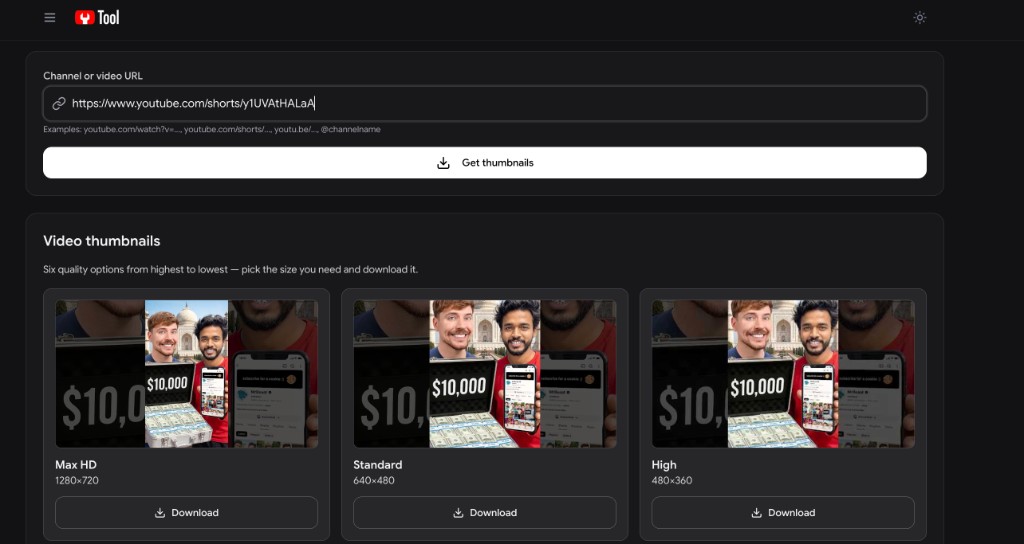
That is the full workflow. The YouTube Tool also handles long-form watch URLs and channel-wide thumbnail batch downloads if you are building a swipe file across a creator's catalog.
Is the Shorts URL different from a long-form YouTube link?
Yes for the watch page, no for the thumbnail file. YouTube uses different public URL paths depending on how you open a video, but every video — Short or long-form — shares one 11-character video ID. That ID is what matters for downloading the cover image.
| Link type | Public URL pattern | Example |
|---|---|---|
| Long-form watch page | youtube.com/watch?v=VIDEO_ID | youtube.com/watch?v=dQw4w9WgXcQ |
| Shorts shelf | youtube.com/shorts/VIDEO_ID | youtube.com/shorts/y1UVAtHALaA |
| Short share link | youtu.be/VIDEO_ID | youtu.be/y1UVAtHALaA |
Paste any of those into The YouTube Tool's thumbnail downloader and you get the same six sizes. YouTube may redirect a Short to a watch?v= URL in your browser — that still works, because the video ID inside the link is identical.
The thumbnail CDN formula does not change between Shorts and long-form. Both resolve to:
https://img.youtube.com/vi/VIDEO_ID/maxresdefault.jpg
Only the path in the public YouTube link differs (/shorts/ vs /watch?v=). The stored JPG on img.youtube.com is the same pattern for every video type.
Why isn't the downloaded Shorts thumbnail vertical?
The Short video plays in 9:16, but the custom thumbnail creators upload in YouTube Studio is still 1280×720 at 16:9, per YouTube's thumbnail spec. YouTube stores and serves that horizontal file on its image CDN.
What you download is that stored cover image — not a frame grab of the vertical player with black bars baked in. Some third-party tools strip or crop Shorts previews differently; a straight CDN pull gives you the official thumbnail file.
If you need the full vertical Short video (not just the cover), use a YouTube Shorts downloader instead — that saves the MP4, which is a different workflow from grabbing the thumbnail JPG.
How do you download a Shorts thumbnail without a tool?
Extract the 11-character video ID from the Shorts URL and plug it into YouTube's public image pattern:
https://img.youtube.com/vi/VIDEO_ID/maxresdefault.jpg
Replace VIDEO_ID with the ID from /shorts/VIDEO_ID. If maxresdefault.jpg 404s or looks wrong, try hqdefault.jpg — YouTube generates that size for every video.
For all six filenames, the manual URL table, and embedding workflows, see how to get a YouTube thumbnail URL. For a comparison of grabber methods (online tool vs extension), see the YouTube thumbnail grabber guide.
What resolution do you get from a Shorts thumbnail download?
The ceiling is the same as any YouTube video: 1280×720 Max HD in JPG. There is no native 4K or vertical-only thumbnail file on YouTube's servers.
| Size | Resolution | Notes |
|---|---|---|
| Max HD | 1280×720 | Creator's custom upload when provided |
| Standard | 640×480 | Smaller CDN tier |
| High | 480×360 | Always available |
| Medium / Low / Alternate | 320×180 and below | Previews and auto-generated frames |
Grab Max HD for archives and mockups; use High when the uploader never supplied an HD custom thumbnail.
Can you download Shorts thumbnails in bulk?
Yes, for channel research. Paste a channel URL or @handle into The YouTube Tool's thumbnail downloader and download cover images from every public video on that channel — Shorts and long-form mixed — in one batch. That beats copying individual Shorts links one at a time when you are auditing a competitor's visual strategy.
Is it legal to download a YouTube Shorts thumbnail?
Downloading for private reference, competitor research, or design inspiration is common and fetches a publicly served image. Republishing someone else's thumbnail as your own, or using it commercially without permission, can infringe copyright and may violate YouTube's Terms of Service. Study the composition; create original art for your own Shorts.
FAQ
How do I download a YouTube Shorts thumbnail on iPhone or Android? Open the Short in your mobile browser, copy the URL, and paste it into The YouTube Tool's thumbnail downloader in the same browser tab. Save the image from the download button — no app install required.
Does a Shorts thumbnail downloader work without watermark? A CDN-based grabber pulls the original file YouTube hosts. The YouTube Tool adds no watermark.
Is there a separate Shorts thumbnail URL format?
The watch link uses /shorts/VIDEO_ID instead of /watch?v=VIDEO_ID, but the thumbnail CDN pattern is the same: img.youtube.com/vi/VIDEO_ID/SIZE.jpg. The YouTube Tool accepts both URL types and extracts the ID automatically.
Can I get a vertical 9:16 thumbnail file for a Short? Not from YouTube's standard thumbnail CDN. Custom uploads are 16:9; vertical previews on the Shorts shelf are rendered by YouTube's player UI, not stored as a separate tall JPG you can download.
What's the difference between downloading a Shorts thumbnail and downloading the Short video? The thumbnail is a small cover image (JPG, up to 1280×720). The video is the full vertical MP4. Use this guide's tool for the image; use a Shorts video downloader for the clip itself.
What else is in the YouTube thumbnails cluster?
- YouTube thumbnail downloader — Pillar: six sizes, channel batch, legal reuse.
- YouTube thumbnail grabber — Online tool vs manual URL vs extension.
- How to get a YouTube thumbnail URL —
img.youtube.com/vi/…pattern for all six filenames. - YouTube thumbnail size — Why the Shorts cover file is still 16:9 at 1280×720.