Free YouTube Shorts Downloader: Save Shorts in HD
Quick answer (TL;DR): To download a YouTube Short, copy its link (tap Share then Copy Link), paste it into The YouTube Tool's downloader, and save the MP4. It is free, has no signup, and gives you a clean, watermark-free file on iPhone, Android, or desktop.
One practical reason to grab Shorts from YouTube instead of TikTok or Instagram Reels: the file comes out clean. TikTok stamps a moving watermark and username onto every saved video, and Instagram does the same with IG Reels. YouTube Shorts do not, so the MP4 you pull is the raw vertical video, ready to re-edit or cross-post without an overlay across the frame. Here is how to download one in seconds.
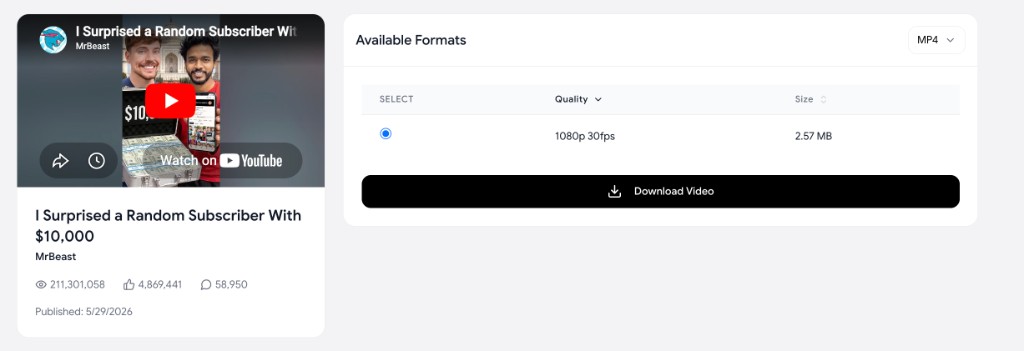
How do you download a YouTube Short for free?
- Copy the Short's link. On the Shorts player, tap Share then Copy Link. On desktop, copy the
youtube.com/shorts/…URL from the address bar. - Paste it into the free downloader. It recognizes Shorts links the same as regular videos.
- Choose your quality and save the MP4. The vertical video downloads straight to your device, no watermark and no account. The screenshot above shows what you get after pasting a link: a preview of the video plus a quality picker and one-click download.
The flow is identical on a phone or a computer. For the full set of methods and devices, the pillar guide on how to download YouTube videos covers everything, and if you need the file in a specific format, see converting YouTube to MP4. Only need the cover image, not the MP4? See YouTube Shorts thumbnail download.
How do you download a Short without a watermark?
You do not need to do anything special, because YouTube Shorts have no watermark to begin with. Unlike TikTok and Instagram Reels, YouTube does not burn the creator's handle or a logo into the video frame, so a straight download already gives you a clean file. Any "remove watermark" tool aimed at YouTube Shorts is solving a problem that does not exist. The only thing to check is that your downloader gives you the full-quality file rather than a re-compressed copy, which a proper downloader does by pulling the original streams.
What quality and length can you expect?
Shorts are vertical, typically up to 1080x1920 (1080p), and a download preserves that full resolution when the creator uploaded it that way. For long-form videos at 2160p or 1080p horizontal, see how to download YouTube videos in 4K and 1080p. On length, YouTube raised the Shorts maximum to three minutes in late 2024 (per YouTube's own help docs), so a "Short" today can run well past the old 60-second cap. File sizes stay small thanks to the short runtime, usually a few tens of megabytes, which makes Shorts the easiest YouTube content to batch-save.
How do you download YouTube Shorts on iPhone and Android?
The browser method works on both, with no app to install:
- iPhone: In the Shorts player tap Share then Copy Link, open the downloader in Safari, paste, download, then tap Share and Save to Files or Save Video.
- Android: Copy the Short's link, paste it into the downloader in Chrome, and the MP4 saves to your Downloads folder or gallery.
Because Shorts are small files, mobile downloads finish almost instantly.
Can you repurpose YouTube Shorts for TikTok and Instagram Reels?
Yes. A clean vertical MP4 is exactly what TikTok and IG Reels want, and a watermark-free Short drops straight into your editing workflow. Creators who shoot once and post everywhere keep a master copy from YouTube because it does not carry TikTok's or Instagram's baked-in overlay.
If short-form clips are part of how you market a product, this cross-posting workflow is exactly the kind of thing a video team handles end to end. Our sister studio, Represent Studio, produces short-form and launch video for SaaS companies if you would rather hand it off than DIY.
What else is in the YouTube download cluster?
- How to download YouTube videos — Pillar guide: every device, playlist, and format explained.
- How to download YouTube videos in 4K and 1080p — When 2160p is real, codec traps, and file sizes.
- YouTube to MP4 — MP4 as the default container; muxing and compatibility.
- YouTube Shorts thumbnail download — Grab the cover JPG only (thumbnails cluster).
FAQ
How do I download a YouTube Short? Tap Share then Copy Link on the Short, paste the link into a free downloader, and save the MP4. It works on iPhone, Android, and desktop with no signup.
Do downloaded YouTube Shorts have a watermark? No. YouTube does not add a watermark to Shorts, unlike TikTok and Instagram Reels, so a normal download gives you a clean file with no overlay.
Can I download YouTube Shorts on my phone? Yes. Copy the Short's share link, paste it into the downloader in your mobile browser, and save. On iPhone use Save to Files; on Android the file goes to Downloads or your gallery. No app needed.
What quality are downloaded Shorts? Up to 1080x1920 (vertical 1080p), matching what the creator uploaded. Because Shorts are short, the files are small and download quickly.
Can I repost a downloaded Short to TikTok or Instagram Reels? Yes, if it is your own content. A clean YouTube download is a common way to keep a master file for cross-posting to TikTok and IG Reels without platform watermarks.