How to Download YouTube Videos Free (Any Device, 2026)
Quick answer (TL;DR): To download a YouTube video for free, copy the video URL, paste it into The YouTube Tool's downloader, pick your format and file size (MP4 up to 4K where the source supports it), and save the file. It runs in your browser with no app, no signup, and no watermark, and it works the same on iPhone, Android, Windows, Mac, and Chromebook.
The fastest way to download a YouTube video as a real file is a browser-based downloader. Paste the link into The YouTube Tool, choose your format and quality, and save an MP4 you can open in any app, move to cloud storage, or edit in a timeline. No install, no account, no watermark.
YouTube's own Download button is a different thing. With YouTube Premium, that button saves an encrypted copy for offline viewing inside the native YouTube app only — not a portable file in your gallery or Files app (YouTube confirms downloads stay locked to the app). Those saves expire after about 29 days offline and disappear if your subscription ends. That is useful for watching on a flight, but it is not the same as owning the video file. This guide focuses on methods that give you an actual MP4 or MP3 on your device.
Can you download YouTube videos?
Yes — just not as a normal file from YouTube itself. Right-clicking a video in the browser gives you the player menu, not a save command, and the official Premium offline feature keeps everything inside the YouTube app.
Most people use one of a few tool types:
- A browser-based downloader — no install, works on any device; best for quick one-off saves.
- Desktop software — Windows and Mac; best for playlists, channels, and bulk jobs.
- A dedicated Android app — sideloaded outside the Play Store; background queues for power users.
- YouTube Premium — the only official route, but offline playback stays inside the app.
- Screen recording — a last resort that captures your screen, not the source file.
For most people on any device, a browser downloader is the right starting point. The YouTube Tool reads the video, shows every quality YouTube actually serves for that upload, and lets you pick the format and exact file size before you commit — so you are not guessing whether 1080p will cost 170 MB or 720p will be enough for your phone's storage.
How do you download a YouTube video for free?
The quickest route needs no software and works everywhere:
- Copy the video URL. Tap Share then Copy Link on mobile, or copy the
youtube.com/watch?v=…address from your browser bar on desktop. Shortyoutu.be/…links and Shorts links work too. - Paste it into the free YouTube downloader. The tool loads the video title, thumbnail, and every available format.
- Pick your format, quality, and file size, then download. Choose MP4 for video (or audio-only if you just want the sound), select the resolution row that matches the size you are willing to store, and save the file to your device.
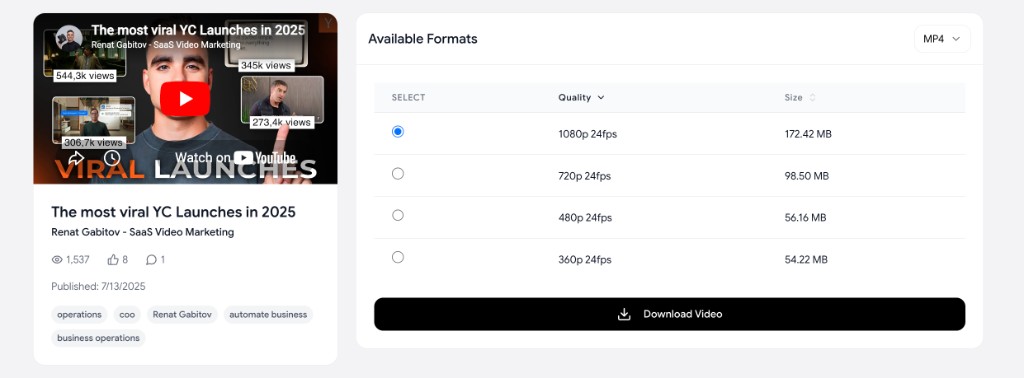
The format dropdown lets you switch between video and audio outputs. The quality table shows the resolution, frame rate, and exact file size for each option — so you can grab 1080p when you need sharp footage or drop to 480p when storage is tight. Because everything runs in the browser, there is nothing to install and nothing to update, and the same three steps work on a phone, a laptop, or a school Chromebook. If you also work with the video's text or images, the same toolkit can pull the full transcript or grab the thumbnail.
How do you download YouTube videos on iPhone?
iPhone is the device people get stuck on, because Safari has nowhere obvious to "save a video" and Apple keeps real downloaders out of the App Store. The browser route gets around both:
- Open the YouTube video, tap Share, then Copy Link.
- In Safari, go to the downloader and paste the link.
- Choose your format and quality, then tap Download Video.
- When the file finishes, open Safari's download list (tap the arrow icon in the address bar), tap the downloaded file, then choose Save to Files or Save Video from the share sheet.
The file lands in your Files app or Photos, where it plays in any app and syncs through iCloud like any other video. No app install, no profile, no shortcut required.
What about YouTube Premium on iPhone? If you subscribe, the Download button inside the native YouTube app saves videos for offline viewing — but only inside that app. YouTube stores them encrypted on your device; they do not appear in Photos or Files as a normal video you can share or edit. Offline playback lasts up to 29 days before the app needs an internet connection to refresh the license, and you lose access to those saves if your Premium membership ends (YouTube Help). Premium is fine for ad-free viewing on a flight; it is not a way to get a portable MP4.
How do you download YouTube videos on Android?
Android gives you two good paths to a real file.
Browser method (recommended): Copy the link, paste it into the downloader in Chrome or your mobile browser, pick your format and file size, and tap download. The MP4 saves to your Downloads folder or gallery, where any app can open it.
Dedicated app: If you download constantly, a sideloaded Android app can queue videos in the background. These apps are not on the Google Play Store — downloading streaming video conflicts with Google's policies around YouTube ad revenue — so you install an APK from the developer's site and enable "install unknown apps." For most people the browser tool is the safer choice.
What about YouTube Premium on Android? The same limits apply as on iPhone. Premium's Download button in the YouTube app saves encrypted files that play only inside the app, not in your gallery or file manager (YouTube's offline FAQ). You need an active Premium subscription, offline playback refreshes every 29 days, and downloaded videos vanish if you cancel. To keep a file you can move, share, or edit, use the browser downloader instead.
How do you download YouTube videos on Windows and Mac?
For one-off saves, the browser downloader is still the fastest path on a computer: paste, pick format and quality, save to your Downloads folder. Where desktop software earns its place is scale. If you regularly save whole playlists, entire channels, or subtitle files, two tools lead:
- 4K Video Downloader Plus is the popular graphical option. Paste a URL, choose quality up to 8K where the source supports it, and it saves real MP4 or MKV files. It handles playlists and channels, and the free tier covers most needs.
- yt-dlp is the open-source command-line tool the entire ecosystem is built on. It is the most capable and flexible option in existence, supports thousands of sites, and updates constantly to stay working (it lives on GitHub). It is overkill unless you are comfortable in a terminal.
What quality and format should you choose?
Two honest facts decide this for you.
You can never get higher quality than the creator uploaded. If a video was only published in 1080p, no tool can produce a real 4K file. "4K" only works when the source is genuinely 4K. We cover this in depth in how to download YouTube videos in 4K and 1080p.
The 720p wall is real. YouTube serves a single combined file (video plus audio) only up to 720p. Above that, it streams the video and audio as separate tracks that a downloader has to merge back together. This is why some weaker tools quietly cap you at 720p, or hand you a silent 1080p file. A good downloader merges the streams so 1080p and 4K come out with sound intact — and shows you the file size for each option before you download.
For format, MP4 is the right default: it plays on every device and in every editor without conversion. Choose MP3 or audio-only when you just want the sound (a podcast, a song, a lecture). If you specifically need an MP4 from a video YouTube serves in another container, see how to convert YouTube to MP4. Downloading a single short clip from a feed video? The same flow handles a YouTube Short.
| Method | Works on | What you get | Best for |
|---|---|---|---|
| Browser downloader | All devices | Real MP4 / MP3 file, pick format and size | Quick, no-install saves anywhere |
| Android APK app | Android only | Real MP4 / MP3, background queue | Frequent downloads on a phone |
| Desktop software | Windows / Mac | Real file, playlists, channels | Bulk and power users |
| YouTube Premium | All devices | Encrypted file, locked to the app | Ad-free viewing inside YouTube |
| Screen recording | All devices | Lower-quality video of your screen | Absolute last resort |
How do you download a whole YouTube playlist or channel?
For a single playlist or an entire channel, the browser tool can take a playlist or channel URL, and desktop software like 4K Video Downloader or yt-dlp is purpose-built for bulk jobs (paste the playlist link and it queues every video). The practical tips: download at a consistent quality so your files match, and save into a dated folder so a 200-video channel does not turn into chaos.
What else is in the YouTube download cluster?
- How to download YouTube videos in 4K and 1080p — When 2160p is real vs upscaled, codec traps, and file-size expectations.
- YouTube to MP4 — Convert to the most compatible container; when MP4 beats MP3 or WebM.
- YouTube Shorts downloader — Save vertical Shorts as clean, watermark-free MP4s.
FAQ
How do I download a YouTube video for free? Copy the video URL, paste it into a free browser-based YouTube downloader, choose your format and file size, and save the MP4. There is no app to install and no account to create, and it works on any device.
How do I download YouTube videos on my phone? Copy the video's share link, paste it into the downloader in your mobile browser, pick a format and quality, and save. On iPhone, open the file from Safari's download list and choose Save to Files; on Android, the file goes to your Downloads folder or gallery. No app install is required.
Can I download YouTube videos in 1080p or 4K? Yes, as long as the creator uploaded the video at that resolution. A good downloader merges YouTube's separate video and audio streams so 1080p and 4K files keep their sound. See downloading in 4K and 1080p for the details.
Why do some downloads have no sound or stop at 720p? YouTube only serves a single combined file up to 720p. Above that, video and audio are separate streams that must be merged. Tools that do not merge them cap at 720p or produce a silent higher-resolution file.
What is the difference between YouTube Premium offline and downloading a file? Premium's Download button saves an encrypted copy that plays only inside the YouTube app for up to 29 days offline. A browser downloader gives you a normal MP4 or MP3 you can open, share, and keep without a subscription.
What is the best format to download in? MP4 for video, because it plays everywhere without conversion. Choose MP3 or audio-only when you just want the sound.