Taplio LinkedIn Video Downloader: Limits + a Free Alternative
Quick answer (TL;DR): Taplio's LinkedIn video downloader is a free web tool at taplio.com: paste a public post link, click Get my video, then Download video. It needs no account, but its page caps you at 3 free downloads a day and wraps the download in prompts for Taplio's paid app. If you've hit the cap or just want the file, paste the same link into our free LinkedIn video downloader. No sign-up, no daily limit, and in our test it saved a 1280×720 MP4 with sound.
Taplio is a LinkedIn growth platform: AI post writing, scheduling, analytics, and engagement tools. The video downloader is one of its free tools, and a popular one. Here's what it does, where it falls short, and what to use instead.
What is Taplio's LinkedIn video downloader?
It's a free page on Taplio's website that saves the video from a LinkedIn post. According to Taplio's page and help center, it works like this:
- Copy the post link: click the ⋯ on the post and choose Copy link to post.
- Paste it into the box on Taplio's downloader page and click Get my video.
- Taplio shows a preview with the author and post stats. Click Download video to save the MP4.
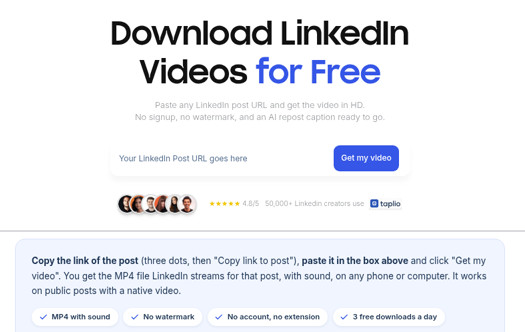
Taplio says the file is "the MP4 file LinkedIn streams for that post", with sound and no watermark, "usually 720p, sometimes 1080p". It runs in the browser, with no extension, no Taplio account, and no LinkedIn login. Like every downloader, it only works on public posts with a video uploaded to LinkedIn.
What are the limits of Taplio's downloader?
We read Taplio's pages and tried the tool on a public video post on October 10, 2026. Here's what we found.
- A daily cap. The page says 3 free downloads a day, resetting every 24 hours. (An older Taplio help-center article says 5; the tool page itself says 3, so plan on that.)
- Upsells around the download. In a normal desktop browser, Taplio returned the post card and a playing video preview in about 15 seconds. Next to it: "Reposting it? Do it the smart way", a locked AI repost caption, and a big blue Unlock my caption and schedule it button. The Download video link you came for is small text underneath. Its daily-limit message ("3 videos downloaded today") offers Sign up and browse the viral library or I'll come back tomorrow. That's fair for a free tool, but it's built to sell Taplio's plans, which start at $39 a month (or $32 billed yearly).
- No quality choice. You get the one version Taplio picks. There's no option to choose a resolution or get audio only.
- File quality not checked. We didn't click Taplio's Download video link, so we can't confirm the resolution of its file.
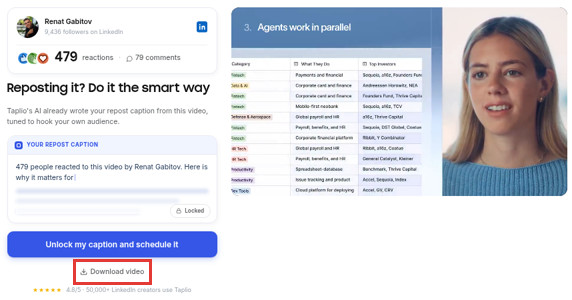
None of this makes Taplio a bad tool. If you use Taplio's app anyway, its downloader fits into that workflow: download, write a caption with its AI, schedule the repost. If you only want the file, the cap and the prompts are in the way.
The free alternative: The YouTube Tool's LinkedIn video downloader
Our LinkedIn video downloader does one job: it turns a public LinkedIn post link into an MP4 file.
| Taplio | The YouTube Tool | |
|---|---|---|
| Price | Free | Free |
| Account needed | No | No |
| Daily limit | 3 a day (per its page) | None |
| Sign-up prompts | Yes, around the download and at the cap | None |
| Quality | "Usually 720p, sometimes 1080p" (its claim; we didn't check the file) | Best version LinkedIn serves; 1280×720 on our test post |
| Watermark | None (its claim) | None (our file matched LinkedIn's byte for byte) |
| Extension or app | Not needed | Not needed |
| Extras | AI repost caption, scheduling (paid) | Download only |
To use it:
- Copy the post link, the same way you would for Taplio (⋯ → Copy link to post, or Share → Copy link in the app).
- Paste it into the LinkedIn video downloader and click Download Video.
- The MP4 starts downloading on its own. A preview of the post appears below the box, with a Download again button.
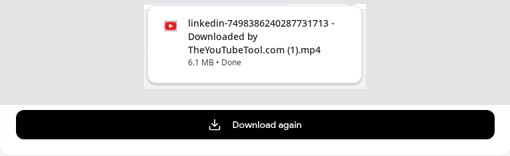
In our October 2026 test, the same public post gave us a 1280×720 MP4 with sound, identical to the 720p file LinkedIn serves. That was the highest-quality version LinkedIn offered for that video.
Be clear about the limits. There's no quality picker and no audio-only option. You get one MP4 at the best quality LinkedIn's public player serves, and on some posts that's below HD; no downloader can add resolution LinkedIn doesn't have. It also only works on public posts.
For phone-by-phone steps and where the file ends up, see how to download a LinkedIn video.
Which should you use?
- Use Taplio's downloader if you're already a Taplio user and want to repost the video with its AI captions and scheduling.
- Use The YouTube Tool if you want the file with no cap, no account, and no sales prompts, or you've used up Taplio's free downloads for the day.
Comparing more options? We tested 8 free tools, including Reepl, Publer, and ContentStudio, in the best LinkedIn video downloaders.
FAQ
Is Taplio's LinkedIn video downloader free? Yes. Its page says you get 3 free downloads a day with no account. You don't need a paid Taplio plan.
Do I need a Taplio account to download a LinkedIn video? No, not for the free downloads. Past the daily limit, Taplio points you to its sign-up page.
What can I use when Taplio's downloader isn't working? Paste the same post link into our LinkedIn video downloader. If neither works, check that the post is public and has a video uploaded to LinkedIn, not a YouTube link.
Related guides
- Best LinkedIn video downloaders: 8 free tools tested on the same post.
- How to download a LinkedIn video: steps for iPhone, Android, Windows, and Mac.