Free YouTube Downloader: No App, No Sign-Up (2026)
Quick answer: Our YouTube video downloader is free and runs in your browser. Paste a video link, click Get download options, pick MP4 or WebM from 360p to 1080p, and click Download Video. For audio, the YouTube to MP3 downloader saves M4A or MP3. There's no app, no account, no watermark and no ads, on iPhone, Android, Windows and Mac.
Plenty of downloaders call themselves free. Fewer stay free once you've clicked: some cap the quality, some stamp a watermark on the file, some want an account or an install, and some pay for themselves with pop-ups. This guide covers what a free downloader should give you, what the catches look like, and which guide to read for your device or format.
How do you download a YouTube video for free?
- Copy the video link. Use the address bar on a computer, or Share → Copy link in the YouTube app.
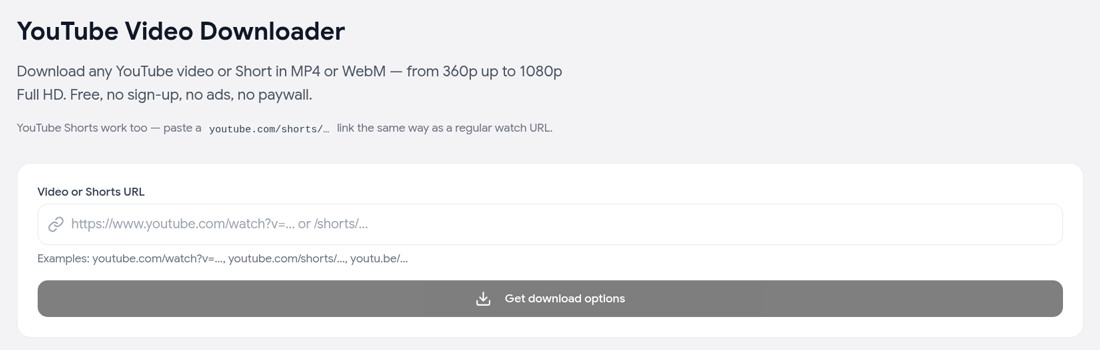
- Paste it into the free YouTube downloader and click Get download options.
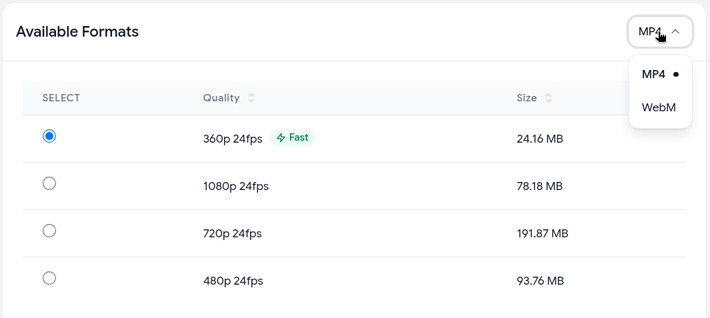
- Choose MP4 or WebM and a quality (360p, 480p, 720p or 1080p, whatever the video offers). The table shows each file's size.
- Click Download Video. The file saves to your Downloads folder with the sound included.
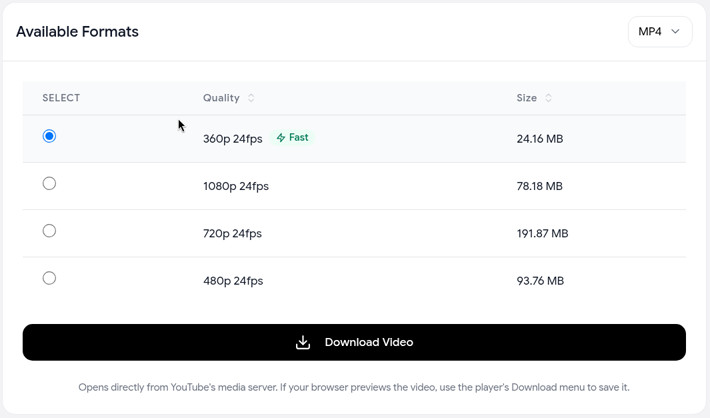
The 360p option marked Fast downloads straight from YouTube's servers. Higher qualities are prepared on our server first, so they take a little longer.
Why use a web downloader instead of an app?
A browser tool is the simplest free option for most people, because there's nothing to install and nothing that keeps running afterwards. Ours is one link box and one button, with no ads and no sign-up prompt:
Here's how the main options compare:
| Option | Cost | Install | What you get | Best for |
|---|---|---|---|---|
| Web downloader (like ours) | Free | None | A real MP4, WebM, M4A or MP3 file | One-off videos on any device |
| Phone apps | Often free with ads or upgrades | Yes | Varies; often installed from outside the official app stores | People who download all day on Android |
| Browser extensions | Usually free | Yes, with access to the sites you visit | A download button on YouTube | Frequent desktop use, if you trust the developer |
| Desktop software | Free tiers, paid upgrades | Yes | Files, often with playlist support | Bulk downloads and whole channels |
| yt-dlp | Free, open source | Yes, command line | Anything YouTube serves | Technical users |
| YouTube Premium | Paid membership | YouTube app | Offline copies inside the YouTube app only | Watching offline, not keeping files |
YouTube Premium is the official option, but it isn't a file download. Videos stay inside the YouTube app and play offline for up to 29 days before the app has to reconnect (YouTube Help).
What do "free" YouTube downloaders usually hide?
Watch for these catches before you trust a tool:
- A quality cap. Free tiers sometimes stop at 720p, or 1080p comes out without sound. Check the quality list before you download.
- Watermarks. A logo burned into the video can't be removed afterwards.
- Daily limits and sign-up walls. "Free" turns into "3 downloads a day" or "create an account to continue."
- Ads, pop-ups and notification prompts. Several "Download" buttons where only one is real, or a request to "allow notifications" that leads to spam ads. This is the main complaint security sites make about Y2mate look-alikes; see Y2mate alternative.
- Bundled installers. A web tool never needs you to install anything. If a "downloader" site pushes an app, extension or .exe, close the tab.
- Broad extension permissions. An extension that can read and change data on every site you visit gets a lot of access in exchange for one button.
Quick checklist for a safe free downloader
- One link box and one clear download button
- The quality and file size shown before you download
- No account, no install, no notification request
- The file plays with sound and has no watermark
What does our free downloader include, and what are the limits?
Included, free:
- MP4 or WebM video at 360p, 480p, 720p or 1080p, depending on the video
- Audio as M4A (YouTube's original track) or MP3 at 128, 192 or 320 kbps, on the audio downloader
- Regular videos, Shorts,
youtu.belinks and YouTube Music song links - No sign-up, no ads, no watermark
Limits, so there are no surprises:
- 1080p maximum. 1440p and 4K aren't available yet.
- One video at a time. Playlist and channel links aren't supported.
- Videos up to 4 hours.
- Fair-use limits keep the tool free for everyone. Normal use isn't affected.
Which guide do you need?
- On an iPhone? How to download YouTube videos on iPhone: Safari steps, where the file lands, and saving to Photos.
- Any other device? How to download YouTube videos covers Android, Windows and Mac.
- Just the sound? YouTube audio downloader: M4A or MP3, and which to pick.
- Need MP4 specifically? YouTube to MP4: format and quality explained.
- Want 4K? Downloading YouTube videos in 4K explains when 4K is real. Our tool currently goes up to 1080p.
- Saving Shorts? YouTube Shorts downloader.
- A whole playlist? How to download a YouTube playlist covers tools for bulk downloads.
FAQ
Is there a completely free YouTube downloader? Yes. Our YouTube downloader is free with no sign-up, no ads and no watermark. The only limits are fair-use caps, a 1080p maximum and one video at a time.
Do I need to install anything? No. It runs in any modern browser on Windows, Mac, Linux, iPhone, iPad and Android.
Does the free version add a watermark? No. You get the video as YouTube serves it. Only the file name mentions theYouTubeTool.com.
Can I download YouTube videos for free in 1080p? Yes, if the video was uploaded in 1080p or higher. The quality table only lists what's available.
Is a free online YouTube downloader safe? It can be. Stick to tools with one clear download button and no installs, pop-ups or notification requests. Our checklist above covers what to look for.
Can I download a YouTube video for free without an account? Yes. You don't need a YouTube account or one with us. The video only has to be public.